Voice quality settings
Settings that influence voice quality and bandwidth can be found in Edit -> Project Settings -> Onset VoIP Settings.
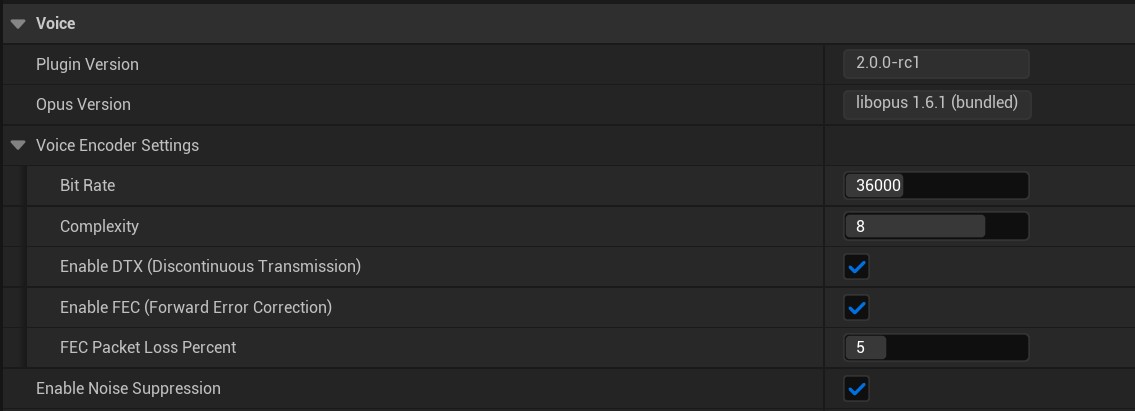
Defaults
| Setting | Default | What it changes |
|---|---|---|
| Bit Rate | 36000 | Target Opus bitrate in bits per second. Higher values improve quality but use more bandwidth. |
| Complexity | 8 | Encoder CPU effort. Higher values can improve quality at the same bitrate. |
| Enable DTX | true | Lets Opus avoid sending full voice frames during silence. |
| Enable FEC | true | Adds recovery data that can help hide packet loss. |
| FEC Packet Loss Percent | 5 | Tells Opus how much packet loss to expect when FEC is enabled. Higher values spend more of the selected bitrate on loss resistance. |
| Enable Noise Suppression | true | Runs RNNoise denoising on the microphone signal before encoding. It can reduce background noise, but very quiet or whispered speech may be suppressed. |
If RNNoise support is compiled out in OnsetVoip.Build.cs, Enable Noise Suppression is disabled at runtime even if an old config file still contains it as enabled.
Opus and RNNoise do not run on the game thread, so the CPU cost of Opus complexity and RNNoise noise suppression is less relevant.
Bit Rate
Bit Rate is the main quality vs bandwidth setting. The value is in bits per second, so 36000 means 36 kbit/s before network overhead.
The project setting is clamped from 5000 to 512000, but values above 48000 are rarely useful for game voice chat.
Lower bitrates save bandwidth and can still sound good for normal voice chat. Higher bitrates preserve more detail, but the improvement becomes smaller after a point. For game voice chat, 24000 to 36000 is usually a good range.
Complexity
Complexity controls how much CPU time Opus is allowed to spend looking for a better encode. The project setting is clamped from 1 to 10.
- Lower values reduce CPU cost, but can sound worse at the same bitrate.
- Higher values improve coding efficiency, but every local talker pays the extra encoder cost.
5is a safe default. Use8to10for high quality presets if your target hardware can afford it.
Opus encoding does not run on the game thread, meaning you don't have to worry much about your game thread time. Complexity does not directly increase bandwidth. It changes how well Opus spends the bitrate you already gave it.
DTX
Enable DTX means discontinuous transmission. It reduces bandwidth during silence by allowing Opus to produce tiny silence frames. The plugin also has its own publish suppression, so completely silent sections may not produce voice packets at all.
Keep DTX enabled for most games. Disable it only if you intentionally want more continuous background room tone, or if you are debugging voice start and stop behavior.
FEC
Enable FEC means in-band forward error correction. When enabled, Opus can put recovery data for a previous frame into a later frame. The receive side can use that data to hide some packet loss.
FEC is useful for real-time voice because it does not require retransmitting old packets. The tradeoff is that Opus spends some of the selected bitrate on redundancy, so voice quality can be slightly lower at the same bitrate.
FEC Packet Loss Percent tells Opus how much packet loss to expect and how much of the selected bitrate may be spent on recovery data. Higher values can help on lossy networks, but can reduce quality on clean networks because less bitrate is left for the voice itself.
Noise suppression
Enable Noise Suppression runs RNNoise on the microphone signal before Opus encoding. This helps remove fan noise, room noise, and other steady background sounds before they are sent to other players.
The benefit is usually lower perceived noise and less wasted bitrate on background sound. The cost is extra CPU, and very quiet or whispered speech can sometimes be treated as noise. If your game expects whispers, breathing, or intentionally noisy radio effects, test with noise suppression both on and off.