Voice channels (2D)
This plugin enables you to build systems like phones, walkie-talkies, global voice, and team voice chats with two-dimensional (2D) voice using voice channels. Voice channels are a server-side routing system. Clients do not manage voice channel membership. The server decides who should receive voice data.
Channel 0 is reserved for world, 3D, proximity voice. Positive channel ids are custom 2D channels you choose, for example channel 1 for radio, 2 for team voice, or 3 for global announcements.
Players can be in multiple voice channels. A player can be available through proximity and through a phone or radio at the same time, but each listener will only get one playback for that speaker. If two players share world 0, radio 1, and group chat 2, the listener will not hear the speaker three times.
By default, shared 2D voice channels have priority over proximity and are played once in 2D. But this behavior can be altered in UOnsetVoipTalker:
bEnable2DVoicePlaybackOnBoth2DAnd3Dalso plays 2D channel voice through 3D proximity playback.bEnablePrefer2DVoicePlaybackOn3DIfNearplays 2D channel voice in 3D when the player is nearby, and in 2D when they are farther away.PlaybackDistance2DVoicePlaybackOn3DIfNearcontrols the distance for that nearby check. This should roughly match the attenuation distance of your 3D voice audio component.
Basic setup
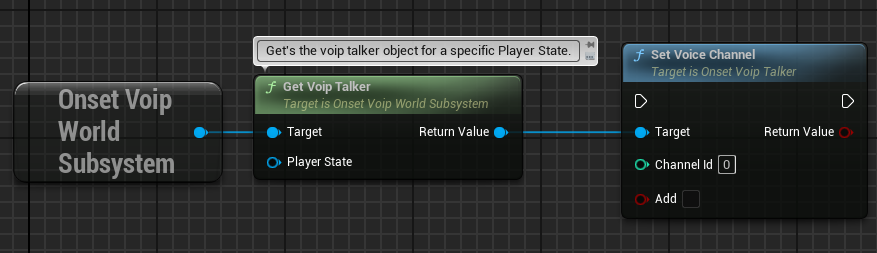
Each player has a UOnsetVoipTalker. On the server, get the talker for the player's APlayerState, then call SetVoiceChannel.
SetVoiceChannel(ChannelId, true)adds the talker to a channel.SetVoiceChannel(ChannelId, false)removes the talker from a channel.IsInVoiceChannel(ChannelId)checks if the talker is currently in that channel.
Use positive channel ids for custom 2D channels. Use 0 only for world, 3D, proximity voice. All talkers are automatically in channel 0. If you remove someone from channel 0, they will no longer hear or talk in proximity.
In this example the function GetVoipTalker returns the corresponding UOnsetVoipTalker object for a specific APlayerState.
Speaking on a specific channel
ToggleVoiceCaptureWithChannel and ToggleVoiceCaptureWithChannels can be used by the local player to say which channel they want to speak on, for example proximity on one key and team voice on another. Use channel 0 when the player wants to speak in proximity.
These functions are only capture hints. They do not add the player to a voice channel. The server must already have put the player's UOnsetVoipTalker in that channel with SetVoiceChannel.
Remember that voice channels are set on the server only. Never on the client.