This online doc is for 2.0+ only. For version 1.X of the plugin (UE 5.4 and earlier) please go to the PDF doc.
Plugin Setup
- Install the plugin via the Unreal Engine Launcher for your engine version.
- Please ensure that any other voice plugins/systems are removed, including their configuration!
- In your project's
Config/DefaultEngine.ini, disable Unreal's built-in voice systems:
[Voice]
bEnabled=False

[OnlineSubsystem]
bHasVoiceEnabled=False
These values must stay False so Unreal's legacy voice system does not start and conflict with Onset VoIP. Onset VoIP 2.0 uses AudioCapture and does not need IVoiceCapture. The engine voice system can also crash during seamless travel.
- Open your project, go to Edit -> Plugins, and search for
Onset VoIP. Enable the plugin and close the editor.
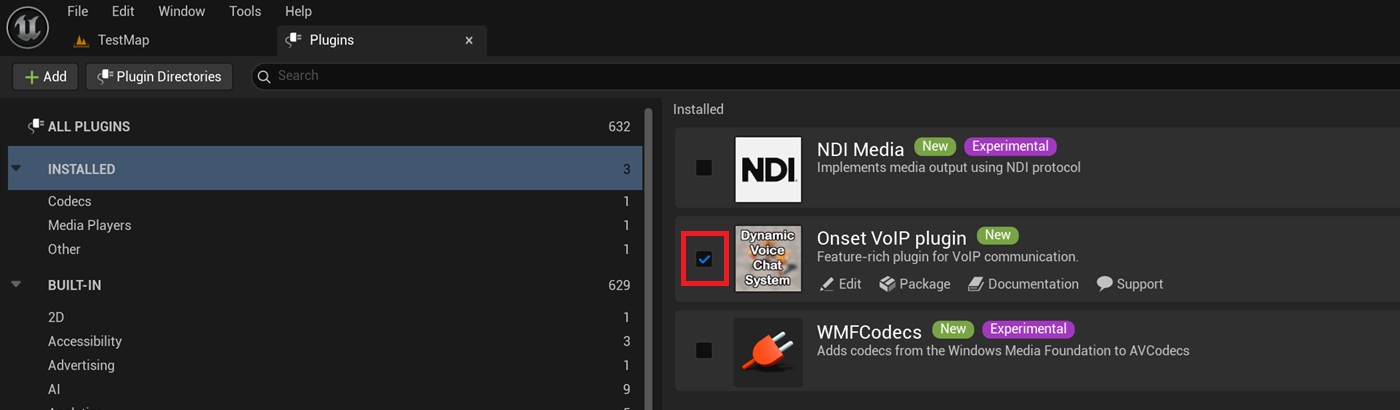
These steps complete the minimum requirements to make the plugin work.
Optional: Manually configure the network channel definition
As of plugin version 2.0, you no longer need to manually configure the net channel in DefaultEngine.ini. The plugin now creates net channels automatically.
If you have special requirements for net channel definitions, such as a custom NetDriver, you can still configure the channel manually.
- Your project should contain
Config/DefaultEngine.ini. Open this file in a text editor. - Add the following lines to your
.inifile.
For Unreal Engine 5.3 or newer:
[/Script/Engine.NetDriver]
+ChannelDefinitions=(ChannelName=OnsetVoip, ClassName=/Script/OnsetVoip.OnsetVoipDataChannel, StaticChannelIndex=3, bTickOnCreate=true, bServerOpen=true, bClientOpen=true, bInitialServer=true, bInitialClient=true)
For Unreal Engine 5.2 and older, note the StaticChannelIndex value:
[/Script/Engine.NetDriver]
+ChannelDefinitions=(ChannelName=OnsetVoip, ClassName=/Script/OnsetVoip.OnsetVoipDataChannel, StaticChannelIndex=2, bTickOnCreate=true, bServerOpen=true, bClientOpen=true, bInitialServer=true, bInitialClient=true)
- The result should look like this:

ChannelDefinitions must stay on a single line, exactly like in the screenshot above, or Unreal will not read it correctly.
- Save the file and open your project in the editor.
Note for third-party OnlineSubsystems such as RedpointEOS:
Some third-party online subsystems override the network channel definitions in their plugin config, such as the /Config folder inside the plugin. In this case, adding ChannelDefinitions to your project config may not work, and you will have to add it to the subsystem plugin config instead. Please ask the creator of the OSS how to configure additional network channels if it does not work for you.
Of course you may also contact me for support.